
The Ledger Stax crypto wallet costs $399 and its 3.7 inch curved E Ink touchscreen is the whole reason for the premium. The screen genuinely makes verifying an address easier. It does not change the security architecture, and the cheaper Flex has more pixels. The premium mostly buys design.
Listen to this article, about 11 minutes. A synthetic voice reads the article and announces each section title as it begins; tables are read row by row and the questions at the end are left out.
Recorded 10 October 2026 from the article as published that day. Press a chapter to jump there; the highlighted line is what is playing. A play button sits beside every section heading, and once you scroll past this player a bar at the bottom of the screen keeps the controls in reach. Tap or click any sentence to hear the reading start from there.
On this page: a comparison table of Ledger models, user reports from online communities, security bulletins, and a setup checklist.
Think you already know this? Five questions, one minute.
Every answer is on this page. Answer from what you know now; the page fills in the rest.
-
1. What is the screen size of the Ledger Stax compared to the Ledger Flex?
According to Ledger’s product page, the Stax features a 3.7 inch screen, whereas the Flex has a 2.8 inch screen. Read the section
-
2. Which secure element chip is used in the Stax, Flex, and Nano S Plus?
The hardware architecture documentation confirms that all three devices run the ST33K1M5C secure element. Read the section
-
3. What physical issue did some owners report regarding the Stax screen display?
On community forums, users reported the black areas of the display degrading near the corners. Read the section
-
4. What security issue did Security Bulletin 023 address in August 2026?
As detailed in Security Bulletin 023, a command interleaving flaw could let a host change signing parameters after the device showed them to you. Read the section
-
5. How does Ledger recommend updating the firmware of the Stax for maximum reliability?
Using a USB C cable is the recommended method because some wireless updates fail to complete cleanly. Read the section
What does the Ledger Stax change compared with a Nano?
Nearly every editorial page ranking for this device is an affiliate review, several titled around it being the best Ledger yet. Here is the boring version, built from Ledger’s own documentation and security bulletins, checked on 12 September 2026.
The Stax is a credit card sized signer with a curved 16 grayscale E Ink touchscreen, Bluetooth 5.2, NFC, USB C and Qi charging. Ledger’s product page lists the screen at 3.7 inches and 400 by 670 pixels. The Flex gets a flat 2.8 inch panel at 480 by 600 behind Gorilla Glass. The Nano S Plus has a 1.1 inch monochrome OLED at 128 by 64 and no radio at all.
| Device | Screen | Resolution | Total pixels | Density | Secure element | Price |
|---|---|---|---|---|---|---|
| Nano S Plus | 1.1 in monochrome OLED | 128 x 64 | 8,192 | about 130 ppi | ST33K1M5C | commonly quoted at $79 |
| Flex | 2.8 in E Ink touchscreen | 480 x 600 | 288,000 | about 274 ppi | ST33K1M5C | $249 |
| Stax | 3.7 in curved E Ink touchscreen | 400 x 670 | 268,000 | about 211 ppi | ST33K1M5C | $399 |
Screens and resolutions come from the three product pages linked above, prices from Ledger’s own comparison page, and secure element part numbers from Ledger’s developer portal. The Nano S Plus price never rendered on Ledger’s shop page, so it is marked commonly quoted rather than verified. Pixel totals and densities are our arithmetic from those published figures.

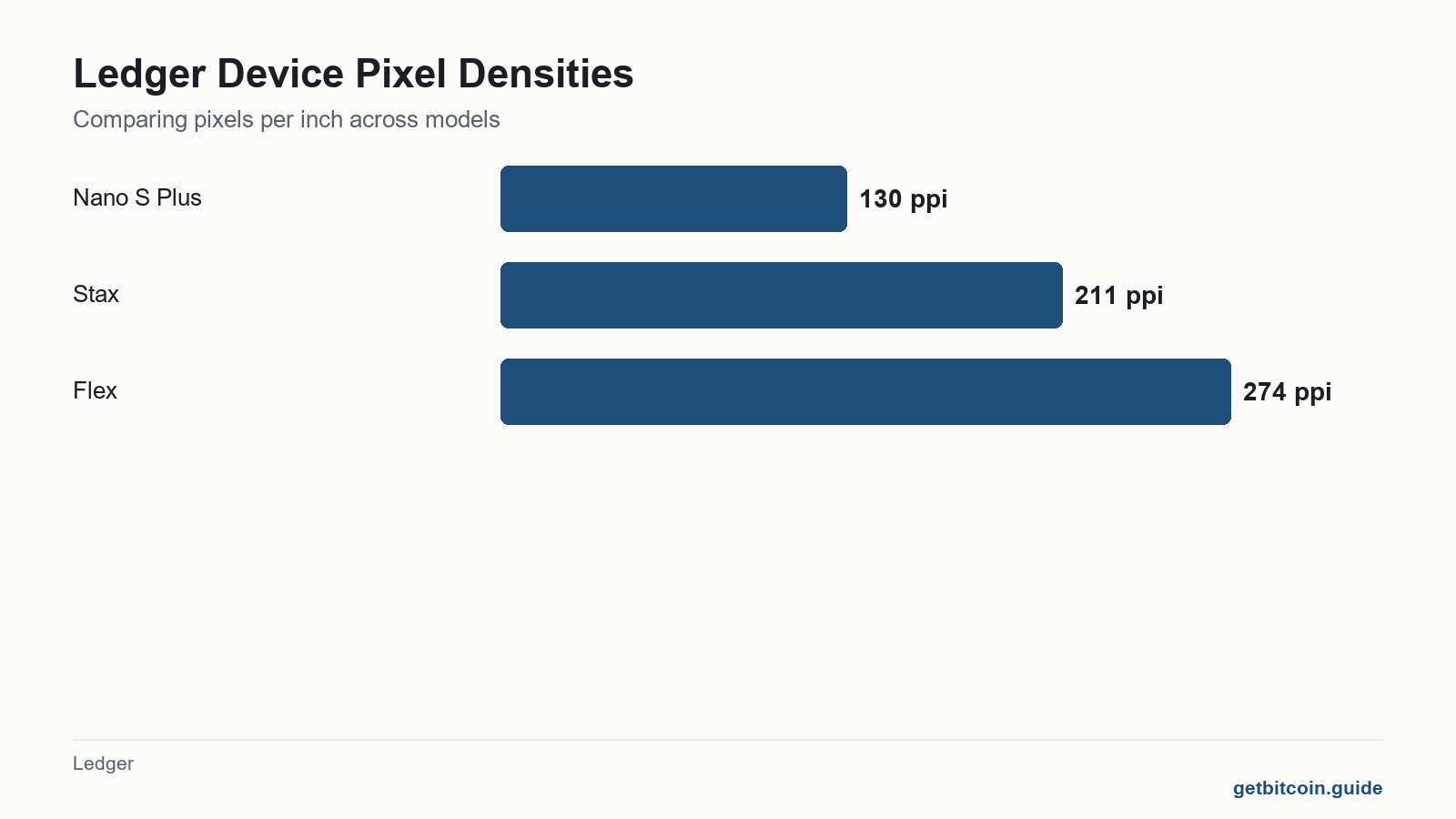
Does a bigger screen make a Bitcoin transaction safer to verify?
Partly, and the useful part is real. A hardware wallet protects you only if you read its screen and what you read matches what you meant to do. On a 128 by 64 pixel Nano you scroll a receiving address through a slot barely wider than a postage stamp, which is exactly where people stop checking properly. The Stax shows the whole thing at once, and ergonomics becomes a security property when the alternative is a user who gives up halfway. A card wallet with no screen at all hands that check to your phone instead, which is the trade we set out in our look at the Tangem crypto wallet and its missing display.
Now the arithmetic nobody selling these devices puts in a table is simple. The Stax has 268,000 pixels and the Flex has 288,000. The device costing $150 more has about 7 percent fewer pixels spread over a larger area, roughly 211 pixels per inch against 274. The Stax is bigger. The Flex is sharper. If the premium is for more detail, the numbers do not support it.
Against a Nano the Stax wins outright, and thirty two times the pixel count is no rounding error. But the honest comparison is Stax against Flex, and that is where the claim about the premium must be tested. Our Ledger Flex review now sets that device against Ledger’s newer and cheaper Nano Gen5, which carries the same secure element and the same NFC for seventy dollars less. Our Nano S Plus review reaches that conclusion from the other end of the range, and the Nano X review covers what Bluetooth does and does not expose.
Which chip drives the screen, and does that change the trust model?
Here the marketing and the documentation drift apart, so precision matters. Ledger describes the Stax and Flex panels as the world’s first Secure E Ink touchscreens, driven directly by the Secure Element chip, and contrasts them with screens driven by general purpose chips that malware can spoof.
Ledger’s own hardware architecture documentation describes the same two chip arrangement on every current device: a microcontroller that, in Ledger’s words, acts as a simple router between the secure element and the peripherals, holding no cryptographic secrets. Ledger’s Nano X security page likewise says that device’s screen and buttons are directly connected to its ST33 secure element.
The part numbers settle it. The Stax, the Flex and the Nano S Plus all run the ST33K1M5C secure element, and the Stax pairs it with the same STM32WB35 microcontroller as the Flex. At $399 you are not buying a different trust boundary. You are buying a larger, curved, touch sensitive window onto the same one. That is a respectable thing to buy. It is not what the affiliate reviews describe.
What do people who own a Ledger Stax actually report?
We read four threads in r/ledgerwallet carrying roughly thirty comments, dated from late 2025 to August 2026, plus Ledger’s Trustpilot profile, at a TrustScore of 3.3 across 2,690 reviews on 12 September 2026. These are accounts of what people report, not test results, and every one is paraphrased.
- In a thread from about 21 August 2026 asking whether the bigger screen is worth it, opinion split cleanly. Several owners said the gain is largest when entering a password and reading contract calls. One who makes one or two Bitcoin transactions a year stays on a Nano S because it has no battery and no radio, so there is less to go wrong. Another argued screen size does nothing about blind signing, since some transfers arrive with no readable detail to display. The thread author disclosed a commercial interest in hardware wallet research.
- In a thread posted in late 2025, an owner who received a Stax in August 2024 reported the black areas of the display degrading, worst at the corners. They posted Ledger support’s reply, which attributed it to moisture intrusion and gave an ideal operating humidity of 40 to 80 percent.
- . A reseller declined support because the screen seal had been removed. A Ledger staff account pointed them to a support ticket, and a second commenter said they had the same fault and were being sent a replacement.
- In a thread from about May 2026, an owner reported that of more than six firmware updates since release only one completed cleanly, with repeated app and lock screen restores and devices left in a bootloader state needing recovery, mostly over Bluetooth. A Flex owner reported the same. One Stax owner said they had never had the problem.
Where the accounts agree with Ledger: the big screen helps most where there is a lot to read, exactly how Ledger frames clear signing. Where they do not: the marketing sells the screen as the upgrade, while the hardest problems owners describe are that screen’s durability and the reliability of updates. Two reports nine months apart describe the same corner darkening, on a device whose entire premium is its display.

What has actually gone wrong at Ledger recently?
This matters more than the tier you pick. In August 2026 Ledger’s own security team published Security Bulletin 023, rated high severity: command interleaving during an on screen review could desynchronise the display from the signature. A host could change signing parameters after the device had shown them to you and before it signed, with nothing on screen to indicate the swap. It sat in the Ledger Secure SDK from August 2025 through v26.6.0, released 11 August 2026, and was fixed in v26.6.1 on 21 August 2026. It affected all Ledger devices running apps built against the vulnerable versions.
Read that alongside the screen argument. For roughly a year, on every device in the range, what you saw was not guaranteed to be what you signed, and a larger panel would not have helped, because the flaw sat in event handling rather than the display. Anyone holding a Ledger should update apps through Ledger Live and confirm the version on the device itself. Two further bulletins that month, 024 and 025, cover a clear signing bypass and a swap flow that accepted a token approval in place of a payment.
Customer data has leaked twice. Ledger’s July 2020 breach exposed roughly 1.1 million email addresses and 272,000 records carrying names, phone numbers and home addresses, dumped publicly that December. On 5 January 2026 Ledger confirmed a further leak through its payments partner Global-e, telling DL News that an unauthorised party had reached a system holding order data for several brands. Ledger did not say how many customers were affected.
The consequence is not that a mailing list threatens your coins. It is that a list of people known to own hardware wallets, with home addresses attached, is in circulation. Ledger’s own ongoing phishing campaigns page currently warns about physical letters carrying QR codes that ask recipients to enter their 24 words, fake firmware update emails, callers impersonating Ledger support, and a counterfeit Ledger application that throws an error and asks for a recovery phrase. Ledger’s line is the right one: there is never a good reason to type your phrase into a computer. No Ledger device will ever ask you to. Our piece on the 24 word seed explains why.
What is worth checking when a Stax arrives?
A checklist built from the failure modes above rather than from a press kit.
- Let the device generate its own phrase on screen. One that arrives with a phrase already written down is one somebody else can empty.
- Never scan a QR code that arrives in the post, however official the letter looks, and never type your 24 words into anything.
- Update the applications through Ledger Live before moving anything of consequence, then check the app version on the device screen, because of Security Bulletin 023.
- Use a cable for firmware updates. Owners report Bluetooth updates failing far more often, and a half applied update is a recovery job.
- Photograph the screen on day one and keep the device dry, so you have a dated baseline if the corner darkening owners describe begins.
- Verify every receiving address on the device screen, not in the app. That is the habit the big screen genuinely makes easier, and the whole reason the device exists.
If the open question is makers rather than tiers, our Trezor and Ledger comparison sets out the open source argument, and what a cold wallet actually is covers the ground beneath all of it. And if the question is whether a hardware device fits at all, or where to buy one after the October 2026 reseller tampering case, how to choose a crypto wallet by threat rather than brand starts from exactly that.
Ledger Stax Setup Checklist
Follow these steps when your Ledger Stax arrives to verify its security and functionality.
Ticks are saved on this device only.
Frequently asked questions
Is the Ledger Stax screen fragile or affected by humidity?
Ledger support has attributed at least one owner reported display failure to humidity ingression and gives an ideal operating humidity of 40 to 80 percent. Separately, two owners in r/ledgerwallet, posting about nine months apart, described corners darkening and ghosting on devices they said had never been dropped. Ledger has published no general advisory about this, so treat it as a pattern in owner reports rather than a confirmed defect.
Does the Ledger Stax use the same recovery phrase as other Ledger devices?
Yes. The Stax generates a standard recovery phrase on the device, and a phrase from another Ledger can be restored onto it. The phrase is the account, not the hardware, so anyone holding it controls the coins regardless of which device you use. Nothing legitimate ever asks you to type it into a computer or a website.
Can the Ledger Stax update its firmware over Bluetooth?
It can, and owners report that it often does not go smoothly. In a thread from about May 2026 one owner said only one of more than six updates had completed cleanly, with several leaving the device in a bootloader state needing recovery. Another owner reported no problems at all. A USB C cable is the more reliable route.
What is the real difference between the Ledger Stax and the Ledger Flex?
Size, shape and price. The Stax has a curved 3.7 inch screen and magnets for stacking, at $399. The Flex has a flat 2.8 inch screen behind Gorilla Glass, at $249. Both run the same ST33K1M5C secure element and the same STM32WB35 microcontroller, so the security architecture is identical. The Flex is the denser display, at roughly 274 pixels per inch against 211.
Will Ledger ever ask me for my 24 word recovery phrase?
No. Ledger’s own phishing page states that there is never a good reason to type your phrase into a computer, and lists current campaigns that do exactly that, including physical letters with QR codes and a counterfeit Ledger application that shows a fake error before requesting the phrase. Any message, call or letter asking for the phrase is an attack, however well branded.
Why do so many Ledger Stax reviews read like advertisements?
Because most of them are paid on commission. Hardware wallet affiliate programmes pay per sale, which rewards a favourable verdict and penalises writing about display faults, failed updates or security bulletins. Checking a claim against the vendor’s own developer documentation and security bulletins, rather than against another review, is the fastest way to tell the two apart.
Finished the page? The same five questions from the top, to see what stuck.
This article is educational and is not financial advice. Nothing here is a recommendation to buy, sell or hold anything. You are responsible for your own security decisions.
Leave a Reply