
Yes, the KeepKey wallet is still maintained, but slowly and unevenly. Its GitHub record shows one firmware release in 2025, two published in 2026, and a security fix and a Bitcoin only build posted as pre releases on 16 October 2026. It has no secure element, so physical theft is its weak point.
Listen to this article, about 12 minutes. A synthetic voice reads the article and announces each section title as it begins; tables are read row by row and the questions at the end are left out.
Recorded 17 October 2026 from the article as published that day. Press a chapter to jump there; the highlighted line is what is playing. A play button sits beside every section heading, and once you scroll past this player a bar at the bottom of the screen keeps the controls in reach. Tap or click any sentence to hear the reading start from there.
On this page: KeepKey firmware releases counted year by year from GitHub, a table setting the vendor’s own status page against the two builds posted on 16 October 2026, and what 13 owner accounts report about the apps around the device.
Think you already know this? Five questions, one minute.
Every answer is on this page. Answer from what you know now; the page fills in the rest.
-
1. How many KeepKey firmware releases did GitHub record in 2025?
The KeepKey firmware releases on GitHub show 7.10.0 on 12 February 2025 as the only release that year, followed by fourteen months with none. Read the section
-
2. On 12 October 2026, which version did KeepKey’s release status page list as the only published firmware?
The KeepKey release status page lists 7.14.1 as published and 7.14.2 as merged but not published, even though GitHub posted 7.14.2 as a pre release on 16 October. Read the section
-
3. According to KeepKey’s own history, when did KeepKey separate from ShapeShift?
KeepKey’s company history says ShapeShift bought it in 2017 and that it went independent after ShapeShift became a DAO in 2021. Read the section
-
4. In December 2019, how much physical access did Kraken Security Labs say it needed to extract a KeepKey’s encrypted seed?
Kraken Security Labs reported voltage glitching with about 15 minutes of physical access and named a strong passphrase as the defence. Read the section
-
5. Which KeepKey build carries Taproot signing?
The 7.14.3 release notes list Taproot signing for the Bitcoin only image, and the status page says it is in review and not published. Read the section
Most KeepKey reviews answer a different question: is it cheap and is the screen big? Both are true, and neither tells you whether anyone will fix the next bug. So this one reads the release record instead, on 17 October 2026, the day after two new builds appeared.
Is the KeepKey wallet still maintained in practice?
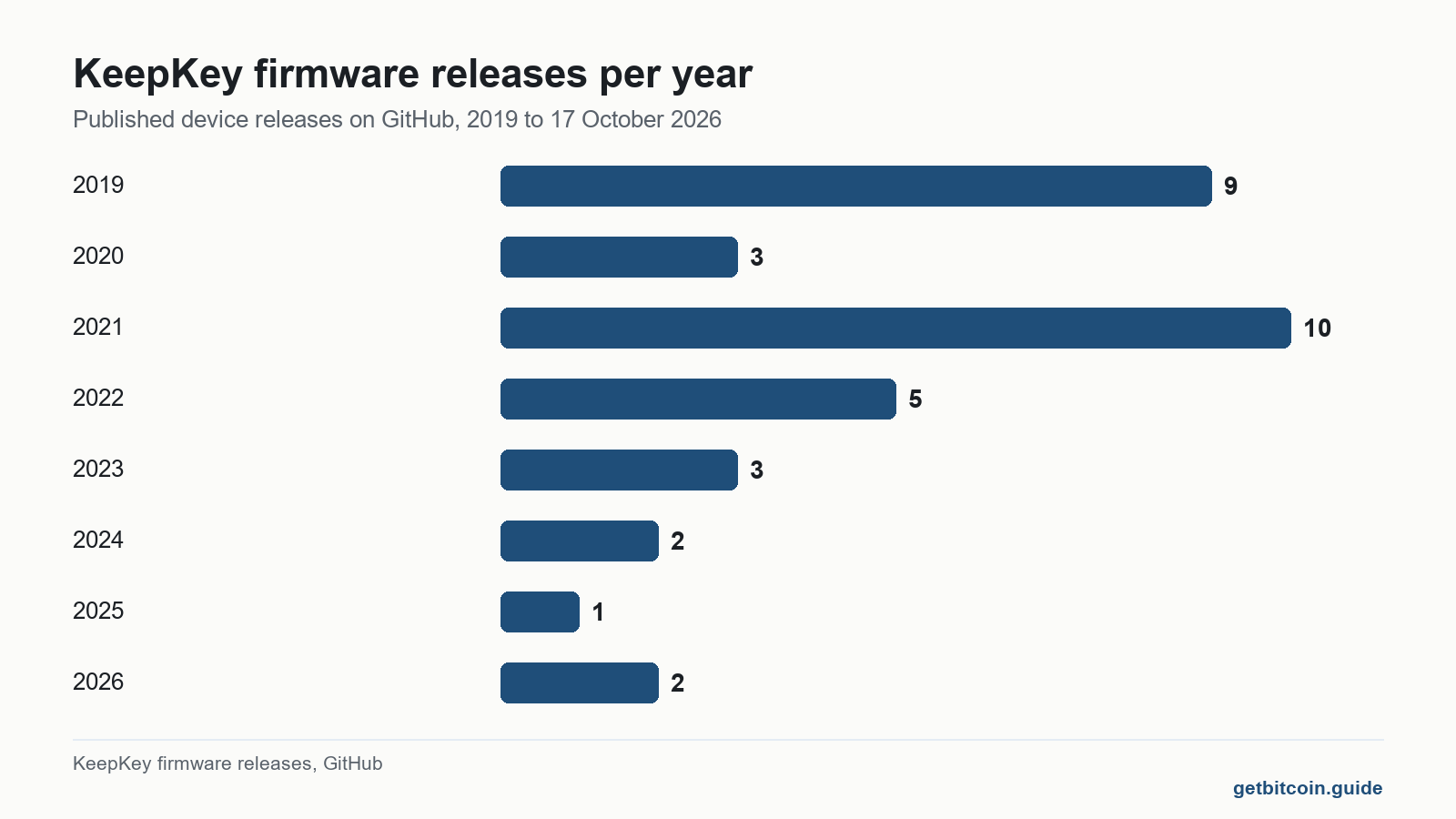
The answer lives in the KeepKey firmware releases on GitHub, not on a review site. Counting published device releases by year, the pace was 9 in 2019, 3 in 2020, 10 in 2021, 5 in 2022, 3 in 2023 and 2 in 2024. Then it nearly stopped. Version 7.10.0, dated 12 February 2025, was the only release that year, and its whole note reads “Add Taproot output support”. Nothing followed for fourteen months.
In 2026 the work came back. Version 7.14.0 arrived on 5 April with new chains, and version 7.14.1 on 5 June with security hardening across signature checks. Then, on 16 October 2026, two more builds were posted, both flagged as pre releases. Version 7.14.2 is described as “a security release” whose purpose is that what the device asks you to approve “now matches exactly what it signs.” Version 7.14.3 is the first Bitcoin only build, with Taproot signing.
Which KeepKey firmware is actually published today?
This is where the vendor’s own pages and its GitHub disagree, and where a careful owner can trip. KeepKey’s firmware release status page, marked reviewed on 12 October 2026, still lists 7.14.1 as the only published build. Four days later GitHub carried files for two newer ones. The KeepKey FAQ agrees with the status page: “The latest firmware release is 7.14.1.”
| Version | KeepKey status page, 12 Oct 2026 | GitHub, 17 Oct 2026 | What it changes |
|---|---|---|---|
| 7.14.1 | Published | Full release, 5 Jun 2026 | Solana, TON and Tron message signing, hardening |
| 7.14.2 | Final QA, merged, not published | Pre release, 16 Oct 2026 | Screens match what is signed; no new features |
| 7.14.3 | In upstream review, not published | Pre release, 16 Oct 2026 | Bitcoin only image with Taproot signing |
| 7.15 | In upstream review | No release | Not described in a release note |
| 7.16 | Candidate | Tag only, no release | Not described in a release note |
The practical rule that follows is boring and correct. Install firmware only through the update screen in KeepKey’s own desktop app, and treat a GitHub pre release as unfinished until the status page calls it published. If you do build or download one, the release notes print the expected hash and point to KeepKey’s guide to verifying KeepKey firmware.
Before you update a KeepKey
Practical checks drawn from KeepKey’s own release notes and status page. Nothing here asks for your words.
General information only, not personal financial advice.
What happened to KeepKey after ShapeShift?
KeepKey’s own company history, dated 30 April 2025, gives the outline. It was founded in 2014 and bought by ShapeShift in 2017. When ShapeShift turned itself into a DAO in 2021, KeepKey went its own way under former ShapeShift engineers. The footer on keepkey.com now reads KeepKey LLC, Denver, and the FAQ says KeepKey “has been independent of ShapeShift for several years.”
The release record fits that story. 2021 was the busiest year on GitHub, ten releases, including version 7.0.3, whose note was later marked as containing a critical vulnerability and superseded within three weeks. After the split the cadence fell year by year until 2025.
What does a KeepKey protect against, and what does it not?
A KeepKey keeps your keys off your computer and shows each transaction on its own screen, which is the main job of any hardware signer. What it does not have is a secure element. KeepKey’s security page says production devices use a “general-purpose microcontroller rather than a dedicated secure element.” The product page makes a virtue of it: “No Proprietary Secure Element, By Design.”

The cost of that choice was measured in public. On 10 December 2019, Kraken Security Labs showed it could extract the encrypted seed by voltage glitching with about 15 minutes of physical access, using a tool it estimated at around $75, and said the flaw was hard to fix “without a hardware redesign.” The short PIN protecting the extracted seed can then be guessed.
The defence both Kraken and KeepKey name is a strong passphrase, because it is not stored on the device and creates a separate wallet. That only helps if the passphrase is long, secret and backed up as carefully as the words. A lost passphrase locks you out just as completely as a thief is locked out.
One small oddity for the spec sheet collectors: the security page names the chip as an STM32F205, while the product page lists an STM32F405. Either way it is a general purpose chip. Devices with a secure element, such as the BitBox02 and its two chip design or the Trezor Safe 5 with its EAL6+ secure element, answer the stolen device problem differently.
Does KeepKey support Taproot and a Bitcoin only firmware?
Partly, and the wording matters. Version 7.10.0 in February 2025 added Taproot output support, which lets you send to a Taproot address. Taproot signing, spending from Taproot yourself, appears in the 7.14.3 Bitcoin only build, which the status page says is not published. The release note adds that “Multi-coin devices stay on v7.14.2.” So, as of 17 October 2026, a Bitcoin only KeepKey exists as a pre release file and not yet as something the app hands you.
A multi coin firmware carries code for every chain it signs. The 7.14.2 security fix was almost entirely about those other chains: EVM token names, THORChain assets, blind signing paths. Readers weighing how much of a wallet you can actually inspect will note that KeepKey publishes reproducible build instructions for every recent release.

What does a KeepKey cost, and why do the prices disagree?
Pages ranking for this device printed four different prices, from $49 to $99, when this site checked them on 11 October 2026, which is what happens when nobody checks twice. The vendor is not much tidier. On 17 October 2026 the KeepKey product page showed $59.95 with free US shipping, while the supported coins page was indexed with $49.95. KeepKey’s security page lists supply chain attacks among the risks its fixes cannot remove, and the price on the official site is the one that is checkable.
What do KeepKey owners actually report?
This review drew on 13 public accounts from the last three years: four issue threads on the KeepKey Desktop GitHub, one Reddit thread with three replies, and the eight newest reviews on Trustpilot. These are what people report, not measurements. None of them described coins lost to a device fault. Almost all described the software around the device.
In May 2026, on r/keepkeydevs, an owner stuck on firmware 7.10.0 said neither KeepKey Vault nor KeepKey Desktop offered an update, and that the site gave conflicting advice on which app was current. KeepKey support replied that 7.14.0 was “in alpha” behind a setting in the Vault app, although GitHub had labelled it a full release in April.
In a July 2025 GitHub issue, a Linux user said the old python library they used with Electrum had broken, and the desktop app stuck on its connect screen. Support answered two days later with a udev rule. In a November 2024 issue, a Windows user reported trying about 50 times to get past the label screen during setup. An October 2024 issue about a passphrase box that would not accept typing in the Linux app was still open on 17 October 2026.
Trustpilot showed 2.8 out of 5 from 285 reviews and none in the last twelve months, which says more about how quiet the shop has been than about the device. The pattern matches the release record: the signer itself is simple, and the friction lives in apps, updaters and support links that have changed names.
How does KeepKey compare with other open source signers?
| Question | KeepKey on 17 Oct 2026 | Source |
|---|---|---|
| Secure element | None, general purpose chip | KeepKey security page |
| Latest published firmware | 7.14.1, June 2026 | KeepKey status page |
| Newest builds | 7.14.2 and 7.14.3, pre release, 16 Oct 2026 | GitHub releases |
| Taproot | Send to Taproot since Feb 2025; signing only in unpublished Bitcoin only build | v7.14.3 notes |
| Connection | USB only | KeepKey product page |
| Price on the vendor site | $59.95 product page, $49.95 on another page | KeepKey product page |
Against the Trezor range and the BitBox02, KeepKey trades a secure element for a large screen and a low price. That trade suits someone whose main threat is malware on a laptop and who keeps the device somewhere safe. It suits less well someone whose threat is the device being taken. Whatever you use, your words belong only in the device’s own restore process, never in a website, a support chat or a form, and how to store a recovery phrase covers the part no firmware can fix. This page describes a device and its upkeep. It is not advice to buy, sell or hold anything.
Frequently asked questions
Is KeepKey still in business?
Yes. KeepKey LLC in Denver runs keepkey.com and published firmware 7.14.1 in June 2026, with two more builds posted as pre releases on 16 October 2026.
Is KeepKey owned by ShapeShift?
No longer. ShapeShift bought KeepKey in 2017, and the company says it has been independent since ShapeShift became a DAO in 2021.
How do I update KeepKey firmware?
Through KeepKey’s desktop app. KeepKey support says that holding the button while plugging the device in opens updater mode, and the app walks you through it.
Does KeepKey work with Electrum?
It has in the past through a python library. One owner reported in July 2025 that this route had broken for them, so check current support before relying on it.
Does KeepKey have Bluetooth?
No. The product page lists standard USB for power and data and names no wireless connection.
What happens if my KeepKey breaks?
Your coins are not on the device. The 12 or 24 word backup, plus any passphrase, restores them on a compatible wallet, which is why that backup matters more than the hardware.
Finished the page? The same five questions from the top, to see what stuck.
This article is educational and is not financial advice. Nothing here is a recommendation to buy, sell or hold anything. You are responsible for your own security decisions.
Leave a Reply