
The Keystone hard wallet signs transactions by camera and QR code, so it never touches USB, Bluetooth or wifi. That removes the cable as an attack path. It does not remove the two risks that empty most wallets: a compromised companion app building the transaction, and a person approving an address without reading the device screen.
Listen to this article, about 14 minutes. A synthetic voice reads the article and announces each section title as it begins; tables are read row by row and the questions at the end are left out.
Recorded 11 October 2026 from the article as published that day. Press a chapter to jump there; the highlighted line is what is playing. A play button sits beside every section heading, and once you scroll past this player a bar at the bottom of the screen keeps the controls in reach. Tap or click any sentence to hear the reading start from there.
On this page: the seven step QR signing path and the three steps that still happen on your online machine, the one sentence in Keystone’s support pages that is the whole security model, what the audits actually covered and left out, and five dated issues from the public tracker.
Think you already know this? Five questions, one minute.
Every answer is on this page. Answer from what you know now; the page fills in the rest.
-
1. How does the Keystone 3 Pro move transaction data on and off the device?
Per Keystone’s product page, which also lists three secure element chips, a 4 inch touchscreen and a $149 price; that transfer claim is the one that changes your threat model. Read the section
-
2. Where does the classic address swapping attack happen?
Three secure elements will sign a theft as willingly as a rent payment, which is why Keystone’s support page says to verify receiving addresses on the device screen. Read the section
-
3. What did the Least Authority audit dated 20 March 2025 cover?
Per the audit report; it did not examine the secure element hardware and its scope was Zcash rather than Bitcoin, and an audit is only ever clean within its scope. Read the section
-
4. What did Cobo do with the Cobo Vault in 2021?
Per the 1 June 2021 post, which offered Cobo Vault owners a 50 percent upgrade coupon; a Cobo Vault on a resale site is a discontinued device. Read the section
-
5. What did the issue opened on 1 August 2026 report about the random PIN pad?
Per issue 2252 on the firmware repository, still open with no maintainer reply when read; a feature meant to defeat shoulder surfing does not if the layout is predictable. Read the section
Search this device and the first page hands you a marketplace listing, a wall of star ratings and a software wallet’s own integration guide. None of them takes the central claim apart. So here it is, taken apart, with the vendor’s documents quoted and the date they were read.
What does the air gap on a Keystone hard wallet actually remove?
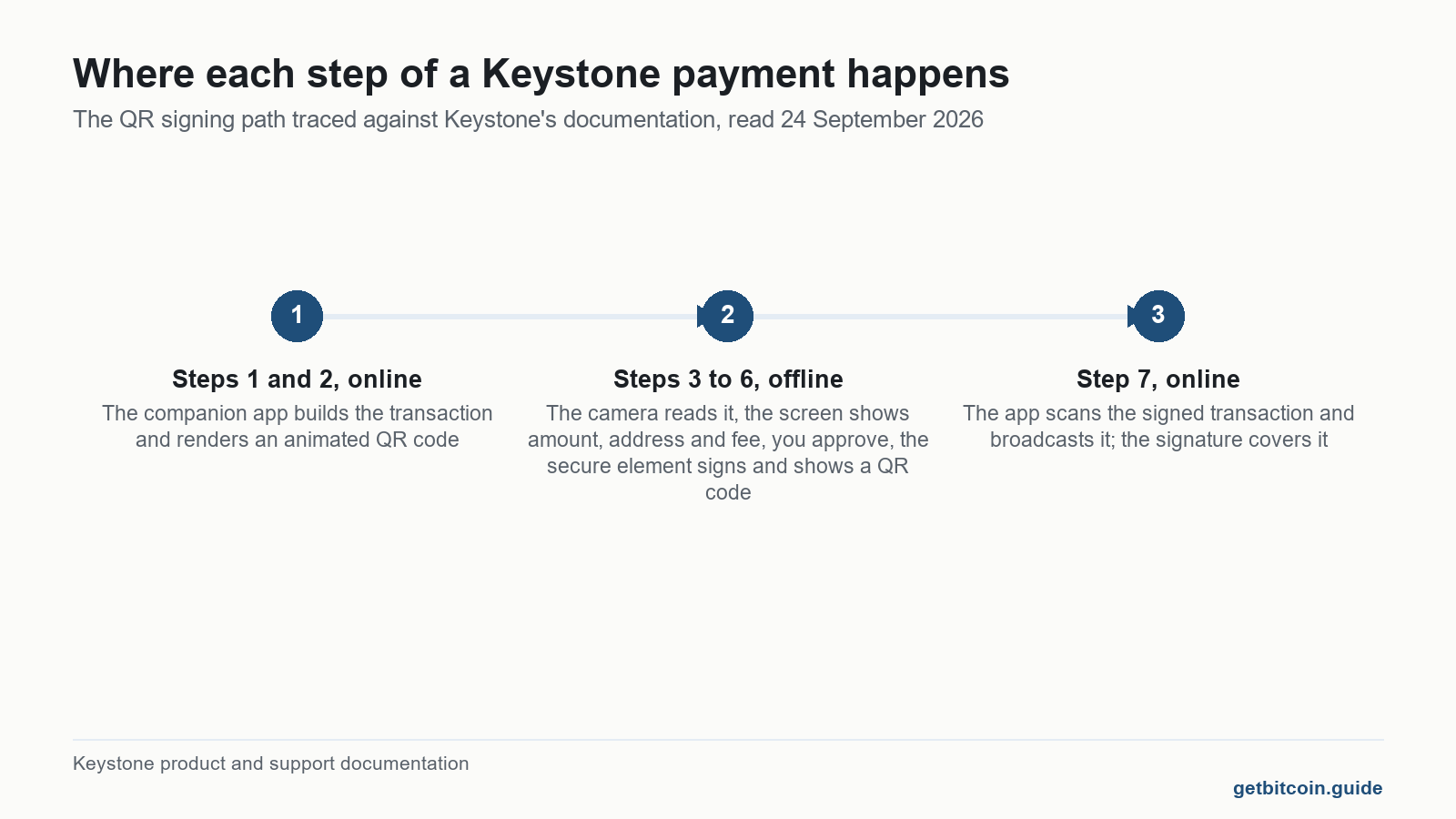
Keystone’s own product page for the 3 Pro says the device “employs QR codes and Micro SD cards for offline data transfer”, alongside three secure element chips, a 4 inch touchscreen, support for 5,500 plus assets and a listed price of $149. The transfer claim is the one worth tracing, because it is the only one that changes your threat model. A payment leaves the wallet in seven steps, and three of them happen on the machine in your pocket.
| Step | Where it happens | What it trusts |
|---|---|---|
| 1. Transaction is built | Companion app, online | That the app has the right destination address |
| 2. App renders an animated QR code | Phone or laptop screen | Nothing secret crosses here |
| 3. Keystone camera reads the code | Device, offline | Its own parser |
| 4. Screen shows amount, address, fee | Device, offline | Your eyes, and nothing else |
| 5. You approve, secure element signs | Device, offline | That you read step 4 |
| 6. Signed transaction shown as a QR code | Device screen | Nothing secret crosses here |
| 7. App scans it and broadcasts | Phone or laptop, online | Nothing, the signature covers it |
Steps two through six are the air gap, and it is real. No driver, no pairing, no cable, so a malicious USB lead has nothing to attach to. Because a QR code is data any scanner can read, the channel is auditable in a way a USB packet never is. The same reasoning applies to every QR based air gapped wallet, including the ELLIPAL.

What does the air gap not remove?
Steps one and seven sit on an internet connected machine, which is exactly where wallet draining malware lives. The classic attack goes nowhere near the cable: it swaps the destination address in the companion app before the QR code is ever drawn, and the Keystone then faithfully signs a payment to a stranger. Three secure elements will sign a theft as willingly as they sign a rent payment.
Keystone knows this and says so in its support pages rather than on the product page. The instruction on receiving cryptocurrency reads: “Please use addresses displayed on the Keystone device to verify receiving addresses, or scan the QR code format of the address displayed on the Keystone device when receiving.” That is the whole security model in one sentence. The device screen is the only link in the chain that malware on your laptop cannot rewrite, so the screen is what you read.
Which leaves the failure no hardware fixes: approving without looking. An air gap protects the key. It has never once protected someone who pressed confirm on a screen they did not read.
Is the Keystone hard wallet really open source?
Mostly, and the gap is documented rather than hidden. The Keystone 3 firmware repository is published in Rust and C on FreeRTOS, and the README is straight about the exception: the MH1903 library ships precompiled rather than as source, for intellectual property reasons, with only its QR code component used. That is a smaller closed surface than most competitors admit to, and a larger one than “open source” implies on a product page. It is the same distinction that separates the devices in our guide to open source crypto wallets.
Better still, there is a verification path you can walk. The repository’s verify document documents a Docker based reproducible build, after which you run a SHA256 checksum on the binary and compare it with the hash the device shows on its own screen. Few wallets at this price offer that, and almost no affiliate review mentions it, because it is hard to put an affiliate link on a Dockerfile.
Independent review exists and is narrower than the marketing implies. Least Authority’s final audit report for Zcash Community Grants, dated 20 March 2025 examined the QR code protocol, the Zcash signing path and key generation in the firmware. It found no critical issues, raised five suggestions and recorded all five as resolved. It did not examine the secure element hardware, and its scope was Zcash, not Bitcoin. An audit is only ever clean within its scope. The same test, applied to a certificate rather than an audit, is run on another QR signing device in what the NGRAVE ZERO EAL7 rating actually covers.
Two more reviews are on record. A post on Keystone’s own blog dated 14 December 2023 reports a Keylabs audit finding “a high severity issue related to tamper response inadequacy, alongside two low Severity firmware issues, and three low severity hardware vulnerabilities”. In January 2024 Keystone announced that Offside Labs had found a firmware vulnerability, fixed in firmware 1.2.8, without saying what it was. Patching and disclosing is the behaviour you want. Declining to describe the flaw is the part to remember.
What happened to Cobo Vault, and why does it matter?
The device has a previous name, and secondhand buyers keep running into it. On 1 June 2021 Lixin, then head of hardware at Cobo, published a post explaining that Cobo had moved the Cobo Vault to minimum maintenance and stopped manufacturing, because a decentralised product no longer fitted a strategy built on centralised services. He left with the original team, started Keystone on the same firmware platform, and offered Cobo Vault owners a 50 percent upgrade coupon. So the engineering lineage is older than the brand, which is a point in its favour, and a Cobo Vault on a resale site is a discontinued device from a company that walked away from the category, which is not.

What do people who have actually used one report?
The affiliate pages restate the specification. The public issue tracker records what actually breaks. Five accounts, all dated and linked, read on 24 September 2026 and their status rechecked on 11 October 2026. They are testimony, not findings.
- The random PIN pad is not random. An issue opened on 1 August 2026 reports that the shuffle uses a fixed compile time seed, so the keypad renders identically on every cold boot. The feature exists to defeat shoulder surfing, and a predictable layout does not. Still open on 11 October 2026. A project contributor replied on the day it was filed that a fix would be worked on, and no fix or pull request has been linked to it since.
- Dice rolls short of the advertised strength. An issue from 17 June 2026 reported that the firmware accepted 50 six sided dice rolls when creating a 24 word wallet, roughly 129 bits of entropy where the format implies 256. The 12 word path was correctly gated. Now closed, and the 2.5.0 firmware release of 29 June 2026 lists improved dice roll entropy validation in its notes.
- A hang on the last seed word. Issue 2032, opened 27 December 2025, from a developer building the published firmware from source, describes the application hanging after the final word of a seed import, and notes recent posts going unanswered. Still open on 11 October 2026, though a contributor posted a root cause on 17 July 2026 and a pull request is linked to the issue, unmerged when this page was checked. This is the build from source path rather than a retail device, which narrows it.
- Large transactions that will not scan. An issue dated 24 September 2026 reports large Zcash transactions failing with an invalid QR code error above roughly 14 KiB. Niche, but a reminder that the QR channel has a ceiling a cable does not.
- A flat battery after two years in a drawer. On Keystone’s Trustpilot page a reviewer reported a unit completely dead after two years of storage, which the company attributed to an over discharged lithium cell, with no prior warning that periodic charging was needed. Another described a device arriving with a dead camera and a 10 day wait for a refund.
For range: that Trustpilot profile carried 732 reviews and a 4.6 score when it was read, 83 percent of them five stars and 6 percent one star, with the praise going to setup, build quality and support response times. Most owners are happy. The sample above is deliberately the unhappy tail, because that is the part nobody else publishes.
Where the accounts agree with the official line: not one shows a key leaving the device, which is the claim the air gap actually makes. Where they cut against it: a battery powered device sold for long term storage that quietly dies in a drawer is a failure mode the marketing skips, and a security feature that ships deterministic is not something a specification sheet will ever tell you. Neither costs you coins if your recovery phrase is safe. Both are worth knowing first.
How do you check a Keystone before you trust it with anything?
A short checklist, built from the vendor’s own documentation rather than from a review.
- Buy from the vendor or an authorised reseller. Never accept a device that arrives already set up, and never use a seed phrase that came in the box. That is the oldest theft in this category, and it does not care how many secure elements the device has.
- Let the device generate the seed itself. If you use the dice roll option, note the entropy issue above and keep rolling past the minimum the screen will accept.
- Verify the firmware: build from source with the documented Docker image, run the SHA256 checksum, and compare it against the hash the device shows.
- Check what is current. The releases page listed version 3.1.2, dated 10 October 2026, as the most recent release when this article was checked on 11 October 2026. It was 3.1.0 of 17 September when this page was first written, which is the version the setup checklist below still names, and neither release note describes a security fix beyond the phrase enhanced security policies on 3.1.0.
- Verify every receiving address on the device screen rather than in the companion app, exactly as the support documentation instructs.
- Charge it. A hardware wallet with a battery is not a steel plate, and a dead cell is a service call you did not plan for.
| Claim on the product page | What the public record shows | Source |
|---|---|---|
| QR code and microSD transfer only | Confirmed. Removes USB and Bluetooth. Does not remove address substitution in the companion app. | product page and support docs |
| Three secure element chips | Stated in the firmware README. No independent audit of the secure element hardware found in public. | firmware repository |
| Open source | Firmware published. The MH1903 library ships precompiled. Reproducible build documented. | verify.md |
| Audited | Zcash scope only, 20 March 2025, no critical issues, five suggestions all resolved. | Least Authority report |
| Tamper resistant | A 2023 Keylabs audit reported one high severity tamper response issue. | Keystone blog, 14 December 2023 |
None of this says the device is good or bad, and none of it is a view on whether to own one. It is a map of what the air gap covers, which is the key, and what it leaves to you, which is everything on the screen. If that trade is not the one you want, the wider comparison of storage methods runs through the alternatives.
Before you trust a Keystone with anything
Built from the vendor’s own documentation rather than from a review. Tick each one once it is actually done.
A setup checklist from the vendor’s documentation, not a view on whether to own the device or what to keep on it. Ticks are saved on this device only.
What has changed since this was first published?
Firmware moves and issues close, so this page is rechecked on the weekly refresh and the entries below record what moved, when, and where it was read.
- 11 October 2026: current firmware is 3.1.2, released 10 October 2026, up from 3.1.0 of 17 September when this page was written, per the releases page. Its note adds wallet migration over USB for the Core extension and names no security fix.
- 11 October 2026: the random PIN pad issue is still open, but it did get a reply. A project contributor wrote on 1 August 2026 that a fix would be worked on, and no fix is linked to it yet. This page previously said there had been no reply at all.
- 11 October 2026: the seed import hang, issue 2032, is still open, and a contributor posted a root cause on 17 July 2026 with a pull request linked, unmerged when checked.
- 11 October 2026: the closed dice roll issue now points at the 2.5.0 release of 29 June 2026, whose notes list improved dice roll entropy validation.
Frequently asked questions
Is a microSD transfer still air gapped?
Yes in the sense that matters: the card carries data between two machines that are never electrically connected, with no network or driver involved. It is not identical to the QR path, though, because you cannot read a microSD card with your eyes. A QR code any scanner can decode. A card you have to trust.
What happens if a Keystone hard wallet goes flat in storage?
It is a battery powered device, and at least one Trustpilot reviewer reported a unit completely dead after two years untouched, which Keystone attributed to an over discharged lithium cell. Nothing is lost if your recovery phrase is intact, because the phrase holds your coins, not the device. It does mean a unit left in a safe needs charging occasionally.
Can Keystone recover your coins if the device is lost or destroyed?
No, and that is by design. The company never holds your keys and cannot reconstruct them. Your recovery phrase is the only backup that exists, which is why where you keep it matters more than which device you bought. Anyone offering a recovery service for a self custody wallet is running a scam.
Is a secondhand Keystone hard wallet safe to set up?
Only if you wipe it and generate a completely new seed phrase on the device yourself, and even then you are trusting firmware that a stranger controlled. A used unit arriving with a working wallet on it, or with a phrase written on a card, is a theft in progress. Never use a seed phrase you did not generate.
Does the fingerprint sensor replace the PIN code?
It is a convenience layer on top, not a replacement. Keystone presents it as a faster way to unlock the device and approve transactions, with the PIN remaining the fallback. A fingerprint is also not a secret in the way a PIN is, since you leave copies of it on everything you touch.
Does three secure element chips mean three times the security?
Not in any measurable sense. Multiple secure elements split duties and add redundancy, which is a reasonable design, but no independent audit of Keystone’s secure element hardware appears in the public record. The Least Authority review covered the Zcash software path, not the chips. Treat the count as an architecture note, not a security score.
Finished the page? The same five questions from the top, to see what stuck.
This article is educational and is not financial advice. Nothing here is a recommendation to buy, sell or hold anything. You are responsible for your own security decisions.
Leave a Reply