
The Arculus wallet is a metal card that keeps your keys in a secure element and signs only when you tap it to your phone and enter a six digit PIN. The card has no screen, three wrong PINs wipe it, and the Bitcoin path it uses is not the one other wallets check first.
Listen to this article, about 12 minutes. A synthetic voice reads the article and announces each section title as it begins; tables are read row by row and the questions at the end are left out.
Recorded 7 October 2026 from the article as published that day. Press a chapter to jump there; the highlighted line is what is playing. A play button sits beside every section heading, and once you scroll past this player a bar at the bottom of the screen keeps the controls in reach. Tap or click any sentence to hear the reading start from there.
On this page: the signing path traced through Arculus’s own How It Works paper, the three strike PIN rule quoted from the vendor, the Bitcoin derivation path m/0′ that makes a restored phrase look empty in another wallet, prices read off the shop on 7 October 2026, and ten dated App Store accounts plus one documented phishing loss.
Think you already know this? Five questions, one minute.
Every answer is on this page. Answer from what you know now; the page fills in the rest.
-
1. Where do you read the destination address when you send from an Arculus card?
The component list in the Arculus How It Works paper is steel, an NFC secure element, an antenna inlay, a PVC inlay and a polymer layer. There is no display, so the phone is the only place the transaction is shown. Read the section
-
2. What does Arculus say happens after three failed PIN attempts?
The vendor paper says attempts are counted on the card and “after 3 failed PIN attempts, the card is reset and the keys on the card are wiped”. The support article on locked cards says the recovery phrase is then the only way back in. Read the section
-
3. Your Arculus card is lost. What does the vendor tell you to do?
The support page on a lost or stolen card gives both routes. Arculus does not store anyone’s recovery phrase and cannot recover it for you. Read the section
-
4. Which Bitcoin derivation path does Arculus say it uses?
Arculus’s own page on restoring elsewhere states that for Bitcoin it uses a derivation path of m/0′, which “may not be supported by other wallets like Ledger, for example”, and that many wallets let you enter the path manually. Read the section
-
5. An email says your Arculus card needs a firmware patch. What is true?
The vendor paper states the card “is shipped locked, meaning the code on the card can’t be updated”. Only the app updates. Arculus guidance on phishing adds that it will never ask for your recovery phrase. Read the section
How does the Arculus wallet actually sign a transaction?
Arculus is two things that only work together: a stainless steel card from Arculus Holdings, the metal card maker CompoSecure’s crypto arm, and a phone app. Keys are generated on the card with a true random number generator inside what the vendor’s own How It Works paper calls a CC EAL6 plus secure element. The paper is blunt about the division of labour: “Your private keys never leave the Secure Element on the Arculus Card, and the card is necessary for signing all transactions.”
The app holds your account public keys and nothing more. To send coins you enter the six digit PIN that is stored on the card rather than on the phone, then hold the card to the back of the handset. The card checks the PIN, signs, and the app broadcasts. Arculus calls this three factor authentication: something you are, a face or fingerprint; something you know, the PIN; something you have, the card.
Two details in that paper matter more than the marketing around them. The radio is near field communication with, in the vendor’s words, “a range of only a few centimeters unlike Bluetooth which has a range of 10 meters”. And the card ships locked, so “the code on the card can’t be updated”. Hold on to that second one. It decides the whole phishing section below, and it is the same trade off as in the Tangem card review, where no updates also means no fixes.
What does the card show you before you approve a payment?
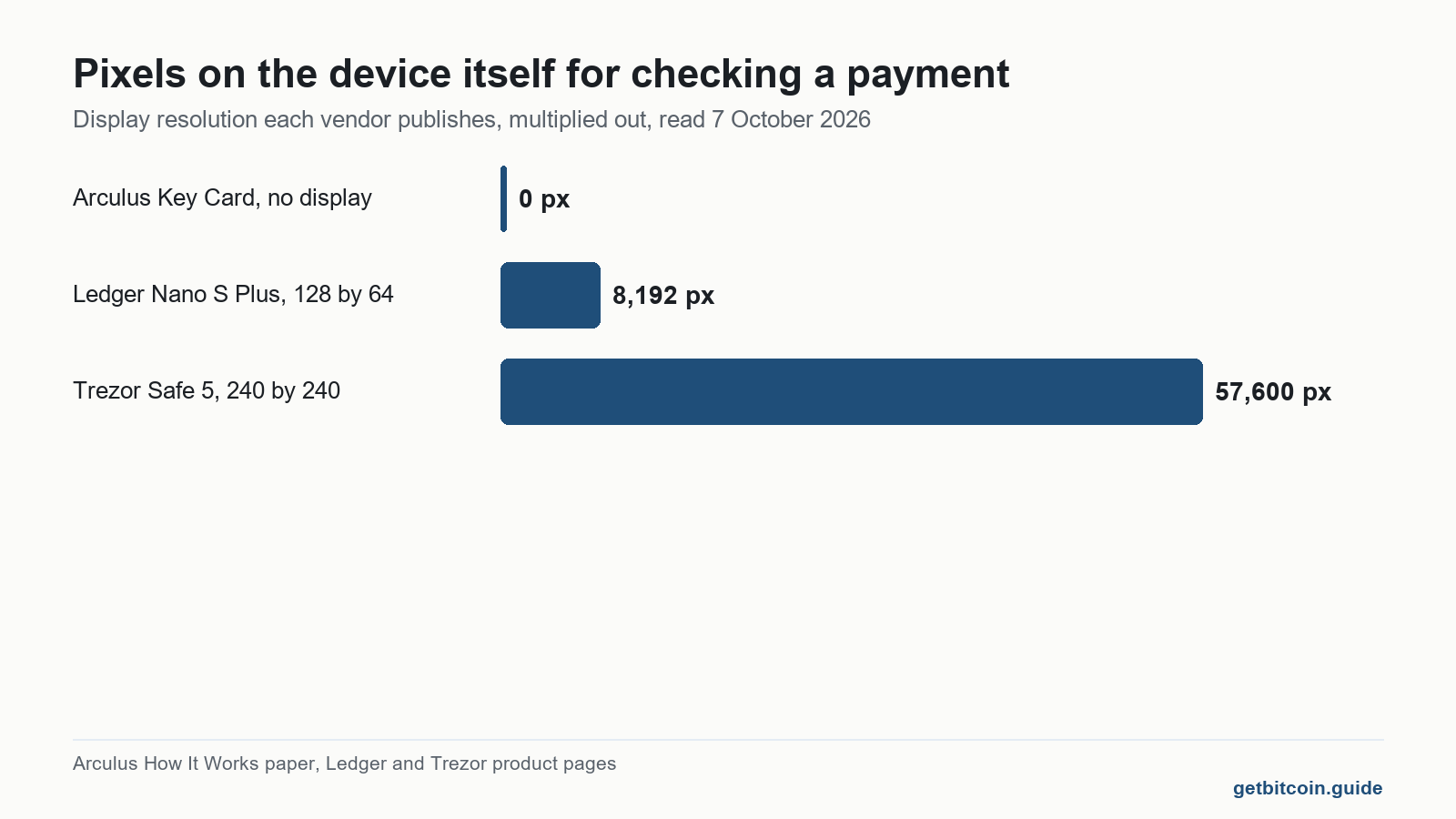
Nothing. There is no display. The components the vendor lists are treated stainless steel, an NFC enabled secure element, an antenna inlay, a PVC inlay and a protective polymer layer. No screen appears in that list because there is no screen in the card.
That matters more than the affiliate reviews let on. On a device with a display, the address and the amount appear on the hardware itself, which is the one link in the chain that malware on your laptop or phone cannot repaint. With Arculus the only place you ever read the destination address is the phone screen, and the card signs whatever the app hands it. The security of the tap is excellent. The security of what you are tapping to approve is the security of your phone. To be fair to the vendor, this is a published design choice and not a reported flaw: searching on 7 October 2026 we found no CVE and no security advisory describing a break of the card itself.
| Device | What the device itself shows you | Wrong PINs before it wipes | Card or firmware updatable |
|---|---|---|---|
| Arculus Key Card | Nothing, there is no display | 3, per the How It Works paper | No, shipped locked by design |
| Ledger Nano S Plus | 1.1 inch monochrome OLED, 128 by 64 pixels | 3, Ledger resets to factory settings | Yes, firmware updates |
| Trezor Safe 5 | 1.54 inch colour touchscreen, 240 by 240 pixels | 16, with a doubling delay each time | Yes, firmware updates |
Read the second column and the fourth together and you have the honest summary of this card. You give up on device verification and you give up the ability to patch, and in exchange you get something that fits in a wallet, never needs charging and has no port to break. The longer version of that argument is in what a cold wallet actually is.
What happens after three wrong PIN entries?
The card locks and wipes. The vendor paper states that PIN attempts are counted on the card and “after 3 failed PIN attempts, the card is reset and the keys on the card are wiped to protect against brute force attacks”. The support article on locked cards says the same thing from the user side: the only way a card locks is three wrong PINs in a row while trying to send, and after that the recovery phrase is the only way back in.

Three strikes is the same budget Ledger gives you. The difference is how often you type the thing. A six digit PIN you last used four months ago, entered while holding a card flat against the back of a phone, with the app warning you this is the last attempt, is a worse position than the number suggests. Trezor’s sixteen attempts with doubling delays are not more secure in theory. They are simply kinder to a human memory.
Nothing is lost if your recovery phrase is good, and everything is lost if it is not. Arculus shows the 12 or 24 word phrase exactly once during setup, makes you type it back, and then, in the paper’s words, “the app will never show your recovery phrase again”. It is kept on neither the card nor the phone.
If the card or the phone is lost, what actually gets you back in?
The recovery phrase, in every branch. The support page on a lost or stolen card tells you to buy a new Arculus card and restore from the phrase, or to restore in a third party wallet app instead if you would rather not replace the card. The restore instructions describe one flow for a new phone and for a new card alike, and it ends with typing the words in. So plan on needing them even in the cases where the card survives.
Two practical notes the review sites skip. The app supports more than one card on the same wallet, which is why the vendor sells a two card bundle, listed at 76.26 dollars against 59.76 dollars for a single card when we read the shop on 7 October 2026, both discounted from a 99 dollar list price. A spare card does not replace a written phrase. It does remove the week you would otherwise spend waiting for the post while locked out.
Card lost, or phone lost: the order the vendor documents
This restates what Arculus publishes about its own recovery process. It asks for nothing, stores nothing, and will never want your recovery words. Neither will anyone else who is telling the truth.
Ticks are saved on this device only. Information about a published process, not financial advice.
Why can a restored Arculus phrase show no Bitcoin at all?
This is the most useful thing on this page, and we found it in none of the reviews ranking for this wallet. A recovery phrase does not contain your addresses. It contains a seed, and wallet software derives addresses from that seed by walking a numbered route called a derivation path. Two wallets with the same words and different paths show two different sets of addresses, and one of them will look empty.
Arculus is explicit about this in its own documentation. Its page on restoring an Arculus wallet elsewhere states that for Bitcoin, Arculus uses a derivation path of m/0′, said aloud as m slash zero hardened, and that this “may not be supported by other wallets like Ledger, for example”. Most wallets reach for the BIP44 style paths instead. The vendor adds that many wallets will let you enter m/0′ manually to find the coins.

Picture the bad evening. The card is gone, you type twelve correct words into a different wallet, and the balance reads zero. Nothing has moved. The new wallet is looking down a different corridor. People in that position search for the wrong thing, meet a helpful stranger, and lose the coins for real. So write the path down beside the words, in plain language: Bitcoin on m/0′, from an Arculus card. Version 3.12.0 of the app, released on 11 June, also added address export, which lets you record your own receiving addresses while everything still works.
Nobody should ever type a recovery phrase into a website, a support chat, a form or an app that was sent to them. There is no legitimate situation in which that is the fix.
Why is an Arculus firmware update always a phishing tell?
Because there is no such thing. The card ships locked and its code cannot be updated, which the vendor presents as a security feature: nothing can introduce hacked or infected code onto it. Follow that to its conclusion and you have a rule that needs no technical knowledge at all. Any message telling you to update, patch or revalidate your Arculus card is false, whatever the sender address says. The app updates. The card does not, ever.
The app genuinely does update, which is where the confusion gets harvested. The App Store listing showed version 3.12.2 published on 11 August, rated 4.6 out of 5 across about 1,300 ratings, and requiring iOS 17.5 or later, when we checked it on 7 October 2026. Those updates arrive through the App Store or Google Play and never through an email.
The attacks are real and documented. A complaint published on ScamCrypto on 25 November 2024 describes a personalised email with the subject line “Private Invitation” that led to a look alike site at arculus.at, where the holder entered a 12 word recovery phrase; the report puts the loss at 102,818 dollars, moved out through several exchanges. That is one person’s report on a complaint board rather than a regulator’s finding, so treat the figure as claimed. The method is not in doubt. Arculus’s own guidance on recognising phishing states plainly that it will never ask for your recovery phrase.
What do people who use Arculus actually report?
We read the ten reviews shown on the App Store review page on 7 October 2026, against an overall 4.6 out of 5 from roughly 1,300 ratings, plus the public complaint above. The balance is mostly positive, so treat what follows as the shape of the complaints rather than the shape of the product.
- A one star review dated 13 July 2024 reports restoring with what the reviewer says was the correct phrase, and a balance that showed nothing.
- A two star review dated 4 September 2024 reports three replacement cards, repeated tap dropouts and balances loading inconsistently.
- Two reviews, from 15 January 2023 and 9 November 2021, report a balance briefly reading zero after a reinstall before correcting itself.
- A five star review dated 15 March 2024 credits support with clearing a cross network token problem that had sat unresolved for two years.
- A January 2023 review calls the in app fees high, which is a swap complaint rather than a custody one.
Those are accounts, not measurements, and two of them are old enough that the app has been rewritten several times since. The pattern that holds up is the tap: the vendor keeps a dedicated help page for the card connection error, which it puts down to the card not being aligned with the phone’s NFC antenna. That matches the reviews almost exactly, and differs from the official story in tone rather than in substance.
Where the accounts and the documentation genuinely part company is the empty balance. Support frames a zero reading as a display problem. The derivation path page shows that a zero reading after restoring somewhere else is the expected result, not a glitch. One claim we could not check at all: a review aggregator asserts that Arculus user emails were exposed, and we found no vendor advisory, regulator filing or news report behind it, so we are not repeating it as fact. For a customer data leak that is documented, at a different vendor, see the SafePal review. Arculus also carries other chains and in app features including swaps and staking, listed on its support site; this site covers custody and security only and takes no view on any of them, and the Zengo write up covers a different answer to the same question.
Frequently asked questions
Does the Arculus wallet work with an iPhone?
Yes. The Arculus Wallet app on the App Store required iOS 17.5 or later when we checked on 7 October 2026, and signing is done by holding the card against the back of the handset so the phone can read it over NFC. An Android app is published separately.
Is the Arculus card air gapped?
Not in the strict sense. There are no cables, no USB port and no battery, but the card talks to the phone over near field communication, which the vendor says reaches only a few centimetres. Tap to sign is a fair description. Fully air gapped is not.
How much does the Arculus wallet cost?
Reading the vendor’s own shop on 7 October 2026, a single card was listed at 59.76 dollars against a 99 dollar list price, and a two card bundle at 76.26 dollars against 198 dollars. Prices on promotion move, so check the shop rather than a review.
Can you use two Arculus cards with one wallet?
Yes. The support site documents setting up and managing multiple cards in the app, which is the point of the two card bundle. A second card shortens a lockout, but it does not replace a written recovery phrase kept somewhere else.
What happens to your coins if Arculus stops operating?
The recovery phrase is generated to the BIP39 standard, so it can be restored in other wallet software. For Bitcoin you will need a wallet that lets you enter the m/0′ derivation path, because that is the route Arculus uses and most wallets do not look there first.
Does Arculus hold your keys or do you?
You do. The vendor states the private keys are generated inside the secure element on the card and never leave it, that the app only ever sees account public keys, and that Arculus does not store any customer’s recovery phrase and cannot recover it for you.
Finished the page? The same five questions from the top, to see what stuck.
This article is educational and is not financial advice. Nothing here is a recommendation to buy, sell or hold anything. You are responsible for your own security decisions.
Leave a Reply